How to Update Your Passport Details on Your Visa?
This post reflects the legal landscape as of the date of publication. Laws may have changed since then. Please consult a legal professional for current information and personalised advice.
Avoid travel disruptions by keeping your Australian visa linked to your current passport. If you’ve been issued a new passport, renewed an existing one, or experienced changes such as loss, damage, nationality, passport number, or sex or gender, you’ll need to update your details through your ImmiAccount with the Department of Home Affairs.
Updating your Passport Details on your IMMI Account
Notifying the department of updates to your passport details while on your Visa can be done through the ImmiAccount Portal.
If you don’t already have an ImmiAccount (for example, if you used an agent to lodge your application) you can create one easily by going to https://online.immi.gov.au/lusc/login and selecting

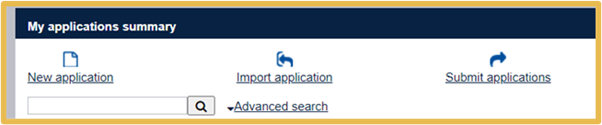
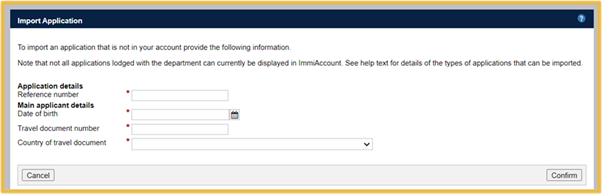
Once you have an ImmiAccount you will need to gain access to your Visa Application by ‘Importing’ your application into your account. To import your application select ‘Import Application’ from the ImmiAccount home screen:
NOTE: You will need to know your Transaction Reference Number (TRN) for your application which looks like this: EGOXXXXXXX and also your passport details (Full Name and Date of Birth) for the other fields. Your TRN should be visible on your visa grant and on the acknowledgement letter you received when you lodged the application.
Once imported you should be able to view your application from the home screen. Select ‘View Details’ on the bottom left to open your application information.
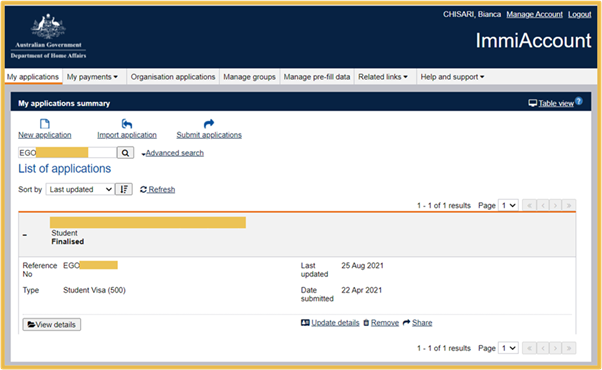
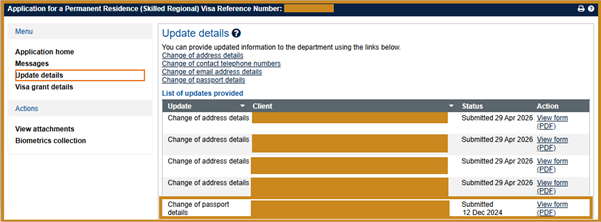
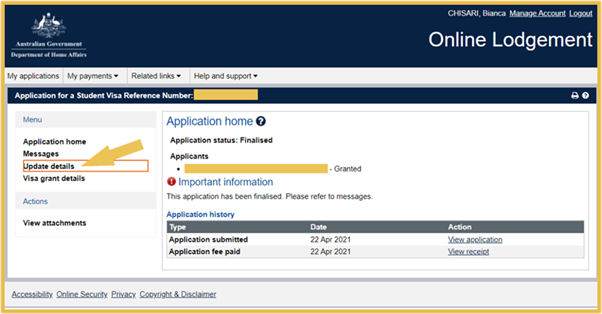
Once you are viewing your application you can then go to ‘Update Details’ in the left-hand menu:
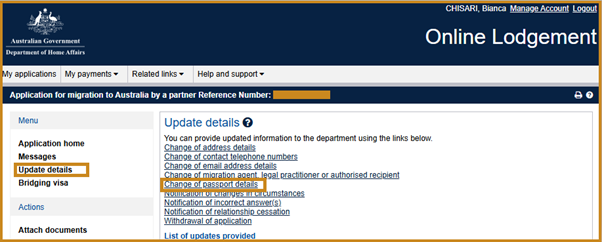
In the ‘Update Details’ menu you can select ‘Change of Passport Details’:
For each applicant (Primary and Secondary Applicants) you can select their name at the top and enter the new passport details in the fields provided under the current passport details. For ‘Type of document’ select “Passport” to show extra fields that are required to be filled. Once entered, select ‘Next’.
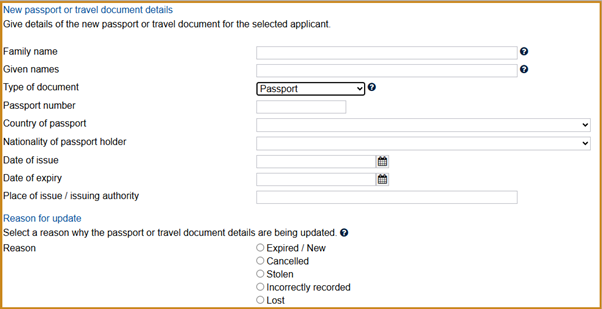
Once you review the changes and select ‘Next’ again, you will then be asked to upload a photo of your new passport identity page. Ensure that the image uploaded is clear and that all number are visible. Once uploaded select ‘Submit’.
After you submit the update, you should receive an email confirming that you have updated your passport details. Your new passport will usually be linked to your visa or application within 72 hours. You can check your submission in your IMMI Account from the ‘List of updates provided’ menu: